Slide 12 Banco de Dados: Uma Aplicação CRUD
12.1 O que é uma Aplicação CRUD?
Hoje vamos desenvolver um cadastro web simples e entender o que é o acronimo C.R.U.D.
12.2 Conceito de CRUD
CRUD é um acrônimo para quatro operações fundamentais que um sistema realiza sobre dados em um banco de dados:

Essas quatro operações compõem a base da maioria das aplicações web que manipulam dados persistidos em um SGBD (Sistema Gerenciador de Banco de Dados).
12.3 O padrão de Design de Sistemas MVC (Model View Controller)
Uma aplicação Cliente-Servidor (modelo 2 camadas) geralmente segue o padrão MVC — Model, View, Controller:

12.4 Construindo uma aplicação CRUD para interfacear com a tabela “Pessoa”
Considere o Diagrama Entidade-Relacionamento abaixo:
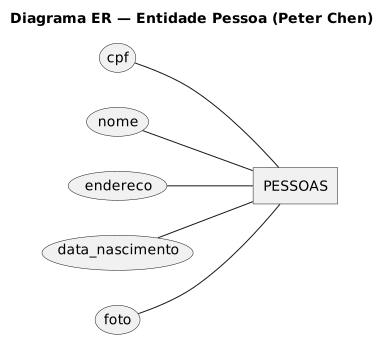
Vamos Converte-lo para o Modelo Físico-Relacional em linguagem SQL:

12.5 Criação de uma aplicação CRUD
Vamos criar um microsas (micro Software As A Service) , ou seja, um site para inserir informações dentro da tabela acima.

| Informações de Projeto | Tecnologias utilizadas no projeto CRUD |
|---|---|
| Servidor de banco de dados SGBD | MySQL 8 |
| Usuário de Banco de Dados | pessoas_user |
| De onde pode ser acessado | Apenas Máquina Local (localhost) |
| Esquema de Banco de Dados | pessoasdb |
| Servidor de Aplicação | Python 3 |
| Cliente da Aplicação | HTML + Javascript |
| Tecnologia de API | RestuFul |
| Biblioteca de Javascript para criar API RestFul | Método Fetch (Biblioteca Padrão do JavaScript para API RestFul) |
| Formato de Dados entre Servidor de Aplicação e Cliente de Aplicação | JSON |

12.5.0.2 Criação do Esquema de Banco de Dados no SGBD MySQL
Agora vamos criar um esquema de Banco de Dados para abrigar nossa futura tabela:

12.5.0.3 Criação da Tabela “pessoas”

-- 3) TABELA 'pessoas' COMPATÍVEL COM O MODELO SQLAlchemy
-- - cpf: chave primária (String(14))
-- - nome, endereco, foto: TEXT
-- - data_nascimento: DATE
CREATE TABLE IF NOT EXISTS pessoas
(
cpf VARCHAR(14) NOT NULL,
nome TEXT NOT NULL,
endereco TEXT NOT NULL,
data_nascimento DATE NOT NULL,
foto TEXT NULL,
PRIMARY KEY (cpf)
) ENGINE=InnoDB DEFAULT CHARSET=utf8mb4 COLLATE=utf8mb4_0900_ai_ci;
-- 4) (OPCIONAL) ÍNDICES PARA BUSCA
-- Seu endpoint usa LIKE/ILIKE em nome e cpf; cpf já é PK.
-- Para acelerar buscas por nome com LIKE, crie um índice por prefixo.
-- OBS: índices em TEXT precisam de comprimento; 128 costuma ser um bom compromisso.
CREATE INDEX idx_pessoas_nome_prefix ON pessoas (nome(128));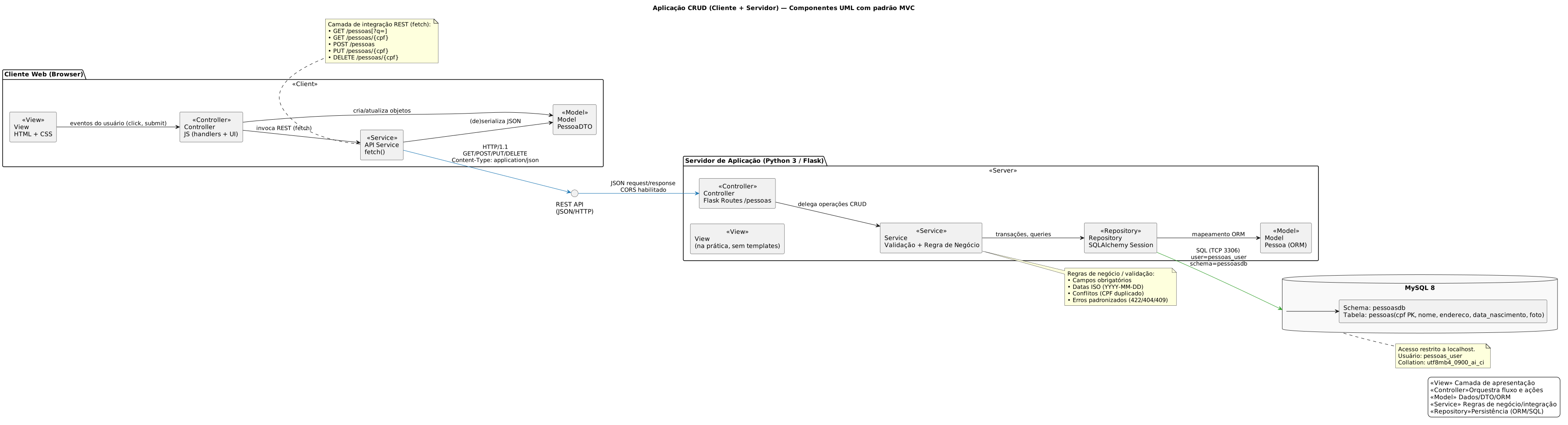
12.5.0.5 Criação do Servidor de Aplicação em Linguagem Python
Vejamos a representação gráfica de nosso servidor utilizando o diagrama de classes da linguagem UML
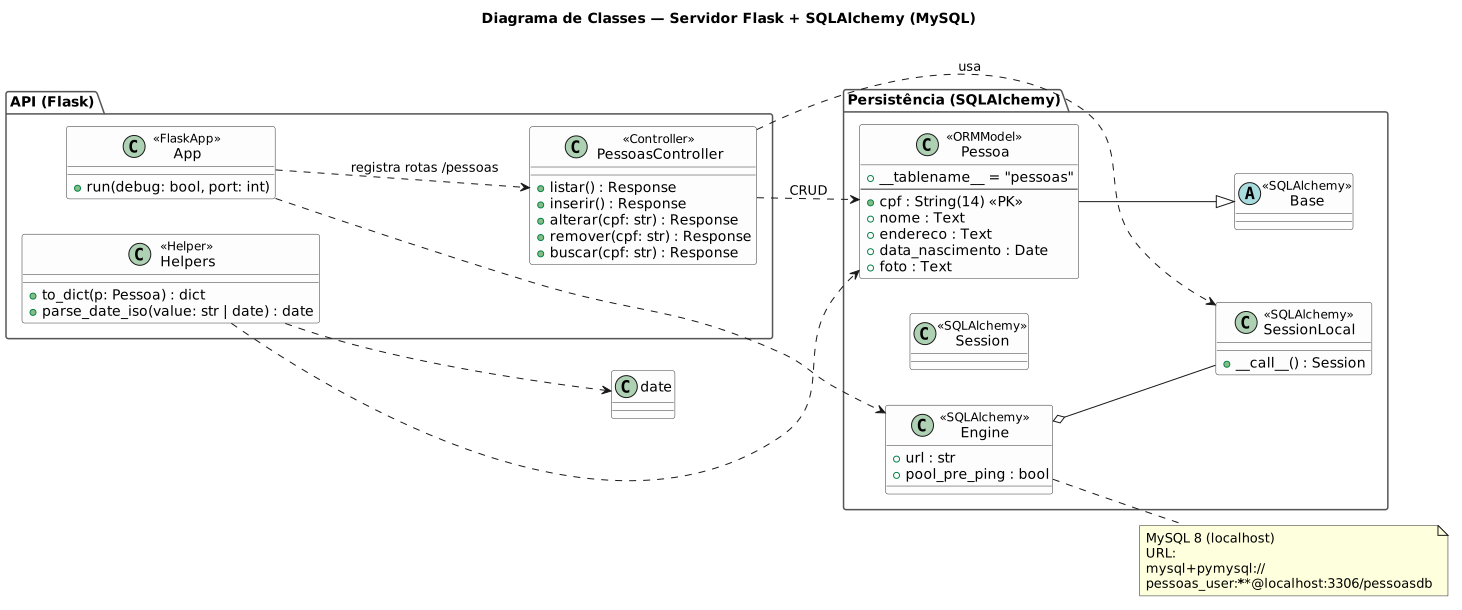
Para utilizar o MySQL como servidor, devemos instalar os drivers de MySQL para a biblioteca SQLAlchemy do Python através da ferramenta de linha de comando PIP do python
pip install flask flask-cors sqlalchemy "pymysql>=1.1"
# (ou use mysqlclient: pip install mysqlclient e troque o driver para mysql+mysqlclient)Agora vamos escrever o script python que criará o servidor de aplicação para interfacear nosso Cliente no Navegador e nossa tabela pessoas dentro do SGBD MySQL:
from flask import Flask, request, jsonify
from flask_cors import CORS
from sqlalchemy import create_engine, Column, String, Date, Text
from sqlalchemy.orm import sessionmaker, declarative_base
from datetime import date
# ------------------------------
# Flask + CORS
# ------------------------------
app = Flask(__name__)
CORS(app) # em produção, restrinja as origens
# ------------------------------
# Banco de Dados MySQL (localhost)
# ------------------------------
# Parâmetros do projeto:
# SGBD: MySQL 8
# Host: localhost
# Usuário: pessoas_user
# DB/Schema: pessoasdb
# Tabela: pessoas
DATABASE_URL = "mysql+pymysql://pessoas_user:MinhaSenhaForte@localhost:3306/pessoasdb"
engine = create_engine(
DATABASE_URL,
pool_pre_ping=True, # evita "MySQL server has gone away"
future=True
)
SessionLocal = sessionmaker(bind=engine, autoflush=False, autocommit=False, future=True)
Base = declarative_base()
# ------------------------------
# Modelo Pessoa
# ------------------------------
class Pessoa(Base):
__tablename__ = "pessoas"
cpf = Column(String(14), primary_key=True)
nome = Column(Text, nullable=False)
endereco = Column(Text, nullable=False)
data_nascimento = Column(Date, nullable=False)
foto = Column(Text) # Base64 ou URL
# Cria a tabela se não existir (deve existir conforme seu script SQL)
Base.metadata.create_all(engine)
# ------------------------------
# Helpers
# ------------------------------
def to_dict(p: Pessoa):
return {
"cpf": p.cpf,
"nome": p.nome,
"endereco": p.endereco,
"data_nascimento": p.data_nascimento.isoformat(),
"foto": p.foto
}
def parse_date_iso(value):
if isinstance(value, date):
return value
return date.fromisoformat(value) # espera "YYYY-MM-DD"
# ------------------------------
# CRUD
# ------------------------------
# Listar todas as pessoas ou pesquisar por termo (?q=)
@app.route('/pessoas', methods=['GET'])
def listar():
termo = (request.args.get('q') or '').strip()
with SessionLocal() as session:
query = session.query(Pessoa)
if termo:
like = f"%{termo}%"
# MySQL é case-insensitive com collation *_ci; ilike é traduzido para LIKE
query = query.filter((Pessoa.nome.ilike(like)) | (Pessoa.cpf.ilike(like)))
pessoas = query.order_by(Pessoa.nome.asc()).all()
return jsonify([to_dict(p) for p in pessoas])
# Inserir nova pessoa
@app.route('/pessoas', methods=['POST'])
def inserir():
dados = request.get_json(force=True)
required = ['cpf', 'nome', 'endereco', 'data_nascimento']
faltantes = [k for k in required if not dados.get(k)]
if faltantes:
return jsonify({"error": "Campos obrigatórios faltando", "fields": faltantes}), 422
try:
dn = parse_date_iso(dados['data_nascimento'])
except Exception:
return jsonify({"error": "data_nascimento inválida. Use YYYY-MM-DD"}), 422
with SessionLocal() as session:
if session.query(Pessoa).filter_by(cpf=dados['cpf']).first():
return jsonify({"error": "CPF já cadastrado"}), 409
pessoa = Pessoa(
cpf=dados['cpf'],
nome=dados['nome'],
endereco=dados['endereco'],
data_nascimento=dn,
foto=dados.get('foto')
)
session.add(pessoa)
session.commit()
session.refresh(pessoa)
return jsonify(to_dict(pessoa)), 201
# Alterar pessoa (PUT)
@app.route('/pessoas/<cpf>', methods=['PUT'])
def alterar(cpf):
dados = request.get_json(force=True)
with SessionLocal() as session:
pessoa = session.query(Pessoa).filter_by(cpf=cpf).first()
if not pessoa:
return jsonify({"error": "CPF não encontrado"}), 404
if 'nome' in dados and dados['nome'] is not None:
pessoa.nome = dados['nome']
if 'endereco' in dados and dados['endereco'] is not None:
pessoa.endereco = dados['endereco']
if 'data_nascimento' in dados and dados['data_nascimento'] is not None:
try:
pessoa.data_nascimento = parse_date_iso(dados['data_nascimento'])
except Exception:
return jsonify({"error": "data_nascimento inválida. Use YYYY-MM-DD"}), 422
if 'foto' in dados:
pessoa.foto = dados['foto']
session.commit()
session.refresh(pessoa)
return jsonify(to_dict(pessoa)), 200
# Remover pessoa
@app.route('/pessoas/<cpf>', methods=['DELETE'])
def remover(cpf):
with SessionLocal() as session:
pessoa = session.query(Pessoa).filter_by(cpf=cpf).first()
if not pessoa:
return jsonify({"error": "CPF não encontrado"}), 404
session.delete(pessoa)
session.commit()
return '', 204
# Buscar pessoa por CPF
@app.route('/pessoas/<cpf>', methods=['GET'])
def buscar(cpf):
with SessionLocal() as session:
pessoa = session.query(Pessoa).filter_by(cpf=cpf).first()
if not pessoa:
return jsonify({"error": "CPF não encontrado"}), 404
return jsonify(to_dict(pessoa))
# ------------------------------
# Inicia o servidor
# ------------------------------
if __name__ == '__main__':
app.run(debug=True, port=5000)12.5.0.6 Criação do Cliente de Aplicação em HTML (Parte Gráfica) e Javascript (Programação Executável)
Vamos verificar como é o Diagrama de Classes do Cliente que vai conversar com o servidor que vimos anteriormente:

Agora vamos verificar o código-fonte.
Salve esse código em um arquivo chamado cliente.html, para poder abrir-lo no navegador, juntamente com o servidor rodando:
<!DOCTYPE html>
<html lang="pt-BR">
<head>
<meta charset="UTF-8">
<title>Cadastro de Pessoas - Flask/MySQL</title>
<style>
body { font-family: system-ui, -apple-system, Segoe UI, Roboto, Arial; max-width: 980px; margin: 24px auto; }
label { display: block; margin-top: 10px; }
button { margin-top: 10px; margin-right: 6px; padding: 8px 12px; }
table { border-collapse: collapse; width:100%; margin-top:20px; }
th, td { border:1px solid #ddd; padding:8px; text-align:left; }
img.thumb { width:60px; height:60px; object-fit:cover; border-radius:4px; }
.row { display:flex; gap:8px; align-items:center; flex-wrap:wrap; }
</style>
</head>
<body>
<h1>Cadastro de Pessoas (Flask/MySQL)</h1>
<form id="formPessoa">
<label>CPF (chave primária): <input id="cpf" required></label>
<label>Nome: <input id="nome" required></label>
<label>Endereço: <input id="endereco" required></label>
<label>Data Nasc.: <input type="date" id="data_nascimento" required></label>
<label>Foto: <input type="file" id="foto" accept="image/*"></label>
<div class="row">
<button type="button" id="btnInserir" onclick="inserir()">Inserir</button>
<button type="button" id="btnAlterar" onclick="alterar()">Alterar</button>
<button type="button" id="btnRemover" onclick="remover()">Remover</button>
</div>
</form>
<h2>Pesquisar</h2>
<div class="row">
<input id="pesquisa" placeholder="Digite nome ou CPF" style="flex:1">
<button type="button" id="btnPesquisar" onclick="pesquisar()">Pesquisar</button>
<button type="button" onclick="listar()">Listar tudo</button>
</div>
<table>
<thead>
<tr>
<th>CPF</th><th>Foto</th><th>Nome</th>
<th>Endereço</th><th>Nascimento</th>
</tr>
</thead>
<tbody id="tabela"></tbody>
</table>
<script>
const API = 'http://localhost:5000/pessoas';
/* ---------- Helpers ---------- */
function setBusy(busy) {
for (const id of ['btnInserir','btnAlterar','btnRemover','btnPesquisar']) {
const el = document.getElementById(id);
if (el) el.disabled = busy;
}
}
function validaCampos() {
const campos = ['cpf','nome','endereco','data_nascimento'];
for (const id of campos) {
const valor = document.getElementById(id).value.trim();
if (!valor) {
alert(`O campo "${id}" não pode ficar em branco.`);
return false;
}
}
return true;
}
function getFotoBase64() {
const file = document.getElementById('foto').files[0];
if(!file) return Promise.resolve('');
return new Promise((resolve,reject)=>{
const reader = new FileReader();
reader.onload = () => resolve(reader.result);
reader.onerror = reject;
reader.readAsDataURL(file);
});
}
function coletaDados(base64Foto){
return {
cpf: document.getElementById('cpf').value.trim(),
nome: document.getElementById('nome').value.trim(),
endereco: document.getElementById('endereco').value.trim(),
data_nascimento: document.getElementById('data_nascimento').value, // YYYY-MM-DD
foto: base64Foto || ''
};
}
async function readJsonSafe(res) {
const ct = res.headers.get('content-type') || '';
if (ct.includes('application/json')) {
try { return await res.json(); } catch { return null; }
}
return null;
}
/* ---------- CRUD ---------- */
async function inserir() {
if(!validaCampos()) return;
setBusy(true);
try {
const base64 = await getFotoBase64();
const pessoa = coletaDados(base64);
const res = await fetch(API, {
method: 'POST',
headers: {'Content-Type': 'application/json'},
body: JSON.stringify(pessoa)
});
const data = await readJsonSafe(res);
if(res.ok) {
alert('Inserido com sucesso!');
listar();
document.getElementById('formPessoa').reset();
} else {
alert('Erro: ' + (data?.error || res.statusText));
}
} catch (e) {
alert('Falha ao inserir: ' + e.message);
} finally {
setBusy(false);
}
}
async function alterar() {
if(!validaCampos()) return;
const cpf = document.getElementById('cpf').value.trim();
setBusy(true);
try {
const base64 = await getFotoBase64();
const novosDados = coletaDados();
if (base64) novosDados.foto = base64;
const res = await fetch(`${API}/${encodeURIComponent(cpf)}`, {
method: 'PUT',
headers: {'Content-Type': 'application/json'},
body: JSON.stringify(novosDados)
});
const data = await readJsonSafe(res);
if(res.ok) {
alert('Alterado com sucesso!');
listar();
} else {
alert('Erro: ' + (data?.error || res.statusText));
}
} catch (e) {
alert('Falha ao alterar: ' + e.message);
} finally {
setBusy(false);
}
}
async function remover() {
const cpf = document.getElementById('cpf').value.trim();
if(!cpf) return alert('Informe o CPF para remover.');
if(!confirm('Confirma a exclusão?')) return;
setBusy(true);
try {
const res = await fetch(`${API}/${encodeURIComponent(cpf)}`, {method:'DELETE'});
// 204 => sem corpo; não tente parsear JSON aqui
if(res.status === 204) {
alert('Removido com sucesso!');
listar();
return;
}
const data = await readJsonSafe(res);
if(res.ok) {
alert('Removido com sucesso!');
listar();
} else {
alert('Erro: ' + (data?.error || res.statusText));
}
} catch (e) {
alert('Falha ao remover: ' + e.message);
} finally {
setBusy(false);
}
}
async function pesquisar() {
const termo = document.getElementById('pesquisa').value.trim();
setBusy(true);
try {
const url = termo ? `${API}?q=${encodeURIComponent(termo)}` : API;
const res = await fetch(url);
const data = await readJsonSafe(res);
if(!res.ok) return alert('Falha na pesquisa: ' + (data?.error || res.statusText));
preencheTabela(Array.isArray(data) ? data : (data?.items ?? []));
} catch (e) {
alert('Falha na pesquisa: ' + e.message);
} finally {
setBusy(false);
}
}
async function listar() {
setBusy(true);
try {
const res = await fetch(API);
const data = await readJsonSafe(res);
if(!res.ok) return alert('Falha ao listar: ' + (data?.error || res.statusText));
preencheTabela(Array.isArray(data) ? data : (data?.items ?? []));
} catch (e) {
alert('Falha ao listar: ' + e.message);
} finally {
setBusy(false);
}
}
/* ---------- UI ---------- */
function preencheTabela(lista){
const tbody = document.getElementById('tabela');
tbody.innerHTML = '';
(lista || []).forEach(p=>{
const tr = document.createElement('tr');
tr.innerHTML = `
<td>${p.cpf}</td>
<td>${p.foto ? `<img class="thumb" src="${p.foto}" alt="foto">` : ''}</td>
<td>${p.nome}</td>
<td>${p.endereco}</td>
<td>${p.data_nascimento}</td>`;
tr.onclick = () => {
document.getElementById('cpf').value = p.cpf;
document.getElementById('nome').value = p.nome;
document.getElementById('endereco').value = p.endereco;
document.getElementById('data_nascimento').value = p.data_nascimento;
};
tbody.appendChild(tr);
});
}
listar();
</script>
</body>
</html>12.5.1 Resultado final:

12.5.1.2 Cliente HTML + Javascript ( página ESTÁTICA ) aberta no navegador
12.5.1.2.1 Passo 1 - Preencher dados no formulário do cliente
Vamos inserir dados de exemplo no “cliente WEB” abaixo

12.5.1.2.2 Passo 2 - Pressionar o Botão INSERIR

OBS: Na tela do servidor, é possível verificar as operações HTTP Equivalentes ao SQL que foram executadas entre o Servidor e o Cliente


12.7 Exercícios
12.7.1 Banco de Dados utilizado nos exemplos de aplicações abaixo
Crie o banco de dados abaixo em um servidor mysql 8 ou superior na sua máquina antes de testar os exemplos abaixo:
-- 1) CRIAR BANCO (ajuste o nome se quiser)

CREATE DATABASE IF NOT EXISTS pessoasdb
  CHARACTER SET utf8mb4
  COLLATE utf8mb4_0900_ai_ci;

USE pessoasdb;
-- 2) (OPCIONAL) CRIAR USUÁRIO LOCAL E CONCEDER PERMISSÕES
-- Troque 'MinhaSenhaForte' por uma senha segura
CREATE USER IF NOT EXISTS 'pessoas_user'@'localhost' IDENTIFIED BY 'MinhaSenhaForte';
GRANT ALL PRIVILEGES ON pessoasdb.* TO 'pessoas_user'@'localhost';
FLUSH PRIVILEGES;
-- 3) TABELA 'pessoas' COMPATÍVEL COM O MODELO SQLAlchemy
--    - cpf: chave primária (String(14))
--    - nome, endereco, foto: TEXT
--    - data_nascimento: DATE

CREATE TABLE IF NOT EXISTS pessoas
(
  cpf             VARCHAR(14)  NOT NULL,
  nome            TEXT         NOT NULL,
  endereco        TEXT         NOT NULL,
  data_nascimento DATE         NOT NULL,
  foto            TEXT         NULL,
  PRIMARY KEY (cpf)
) ENGINE=InnoDB DEFAULT CHARSET=utf8mb4 COLLATE=utf8mb4_0900_ai_ci;


-- 4) (OPCIONAL) ÍNDICES PARA BUSCA
-- Seu endpoint usa LIKE/ILIKE em nome e cpf; cpf já é PK.
-- Para acelerar buscas por nome com LIKE, crie um índice por prefixo.
-- OBS: índices em TEXT precisam de comprimento; 128 costuma ser um bom compromisso.

CREATE INDEX idx_pessoas_nome_prefix ON pessoas (nome(128));12.9 Exemplo 02 - SERVIDOR DE APLICAÇÃO PYTHON

Neste exemplo, temos uma aplicação cliente feita html e javascript
A interface do Cliente é feita em HTML5
A conexão com o servidor é feita pelo javascript incorporado no HTML:
CRUD no cliente é feito peloa javascript utilizando metodologia Restful sobre protocolo HTTP 2.0
O servidor Restful é feito em linguagem PYTHON
OBS: NÃO TEMOS CONTROLE DE SESSÃO DE CLIENTE IMPLEMENTADO.
12.9.1 Servidor python
from flask import Flask, request, jsonify
from flask_cors import CORS
from sqlalchemy import create_engine, Column, String, Date, Text
from sqlalchemy.ext.declarative import declarative_base
from sqlalchemy.orm import sessionmaker
# ------------------------------
# Configuração do Flask e CORS
# ------------------------------
app = Flask(__name__)
CORS(app)
# ------------------------------
# Configuração do banco PostgreSQL
# ------------------------------
DATABASE_URL = "postgresql://postgres:MinhaSuperSenha@db.pbbtfwmydxmxdibmtbqq.supabase.co:5432/postgres"
engine = create_engine(DATABASE_URL)
SessionLocal = sessionmaker(bind=engine)
Base = declarative_base()
# ------------------------------
# Modelo Pessoa
# ------------------------------
class Pessoa(Base):
__tablename__ = "pessoas"
cpf = Column(String(14), primary_key=True)
nome = Column(Text, nullable=False)
endereco = Column(Text, nullable=False)
data_nascimento = Column(Date, nullable=False)
foto = Column(Text) # Base64 ou URL
# Cria a tabela se não existir
Base.metadata.create_all(engine)
# ------------------------------
# CRUD
# ------------------------------
# Listar todas as pessoas ou pesquisar por termo
@app.route('/pessoas', methods=['GET'])
def listar():
termo = request.args.get('q', '').lower()
session = SessionLocal()
if termo:
pessoas = session.query(Pessoa).filter(
(Pessoa.nome.ilike(f"%{termo}%")) | (Pessoa.cpf.ilike(f"%{termo}%"))
).all()
else:
pessoas = session.query(Pessoa).all()
session.close()
return jsonify([{
"cpf": p.cpf,
"nome": p.nome,
"endereco": p.endereco,
"data_nascimento": p.data_nascimento.isoformat(),
"foto": p.foto
} for p in pessoas])
# Inserir nova pessoa
@app.route('/pessoas', methods=['POST'])
def inserir():
dados = request.get_json()
session = SessionLocal()
if session.query(Pessoa).filter_by(cpf=dados['cpf']).first():
session.close()
return jsonify({"error": "CPF já cadastrado"}), 400
pessoa = Pessoa(
cpf=dados['cpf'],
nome=dados['nome'],
endereco=dados['endereco'],
data_nascimento=dados['data_nascimento'],
foto=dados.get('foto')
)
session.add(pessoa)
session.commit()
session.close()
return jsonify({"message": "Inserido com sucesso"}), 201
# Alterar pessoa
@app.route('/pessoas/<cpf>', methods=['PUT'])
def alterar(cpf):
dados = request.get_json()
session = SessionLocal()
pessoa = session.query(Pessoa).filter_by(cpf=cpf).first()
if not pessoa:
session.close()
return jsonify({"error": "CPF não encontrado"}), 404
pessoa.nome = dados.get('nome', pessoa.nome)
pessoa.endereco = dados.get('endereco', pessoa.endereco)
pessoa.data_nascimento = dados.get('data_nascimento', pessoa.data_nascimento)
pessoa.foto = dados.get('foto', pessoa.foto)
session.commit()
session.close()
return jsonify({"message": "Alterado com sucesso"})
# Remover pessoa
@app.route('/pessoas/<cpf>', methods=['DELETE'])
def remover(cpf):
session = SessionLocal()
pessoa = session.query(Pessoa).filter_by(cpf=cpf).first()
if not pessoa:
session.close()
return jsonify({"error": "CPF não encontrado"}), 404
session.delete(pessoa)
session.commit()
session.close()
return jsonify({"message": "Removido com sucesso"})
# Buscar pessoa por CPF
@app.route('/pessoas/<cpf>', methods=['GET'])
def buscar(cpf):
session = SessionLocal()
pessoa = session.query(Pessoa).filter_by(cpf=cpf).first()
session.close()
if not pessoa:
return jsonify({"error": "CPF não encontrado"}), 404
return jsonify({
"cpf": pessoa.cpf,
"nome": pessoa.nome,
"endereco": pessoa.endereco,
"data_nascimento": pessoa.data_nascimento.isoformat(),
"foto": pessoa.foto
})
# ------------------------------
# Inicia o servidor
# ------------------------------
if __name__ == '__main__':
app.run(debug=True, port=5000)servidor estará rodando na porta 5000 e EXPÕE A API de operações na URI http://localhost:5000/pessoas sem senha
12.9.2 Cliente HTML (conexão Restful)
crie o arquivo index.html e abra-o no navegador
<!DOCTYPE html>
<html lang="pt-BR">
<head>
<meta charset="UTF-8">
<title>Cadastro de Pessoas - Flask/MySQL</title>
<style>
  body { font-family: system-ui, -apple-system, Segoe UI, Roboto, Arial; max-width: 980px; margin: 24px auto; }
  label { display: block; margin-top: 10px; }
  button { margin-top: 10px; margin-right: 6px; padding: 8px 12px; }
  table { border-collapse: collapse; width:100%; margin-top:20px; }
  th, td { border:1px solid #ddd; padding:8px; text-align:left; }
  img.thumb { width:60px; height:60px; object-fit:cover; border-radius:4px; }
  .row { display:flex; gap:8px; align-items:center; flex-wrap:wrap; }
</style>
</head>
<body>
<h1>Cadastro de Pessoas (Flask/MySQL)</h1>

<form id="formPessoa">
  <label>CPF (chave primária): <input id="cpf" required></label>
  <label>Nome: <input id="nome" required></label>
  <label>Endereço: <input id="endereco" required></label>
  <label>Data Nasc.: <input type="date" id="data_nascimento" required></label>
  <label>Foto: <input type="file" id="foto" accept="image/*"></label>

  <div class="row">
    <button type="button" id="btnInserir" onclick="inserir()">Inserir</button>
    <button type="button" id="btnAlterar" onclick="alterar()">Alterar</button>
    <button type="button" id="btnRemover" onclick="remover()">Remover</button>
  </div>
</form>

<h2>Pesquisar</h2>
<div class="row">
  <input id="pesquisa" placeholder="Digite nome ou CPF" style="flex:1">
  <button type="button" id="btnPesquisar" onclick="pesquisar()">Pesquisar</button>
  <button type="button" onclick="listar()">Listar tudo</button>
</div>

<table>
  <thead>
    <tr>
      <th>CPF</th><th>Foto</th><th>Nome</th>
      <th>Endereço</th><th>Nascimento</th>
    </tr>
  </thead>
  <tbody id="tabela"></tbody>
</table>

<script>
const API = 'http://localhost:5000/pessoas';

/* ---------- Helpers ---------- */
function setBusy(busy) {
  for (const id of ['btnInserir','btnAlterar','btnRemover','btnPesquisar']) {
    const el = document.getElementById(id);
    if (el) el.disabled = busy;
  }
}

function validaCampos() {
  const campos = ['cpf','nome','endereco','data_nascimento'];
  for (const id of campos) {
    const valor = document.getElementById(id).value.trim();
    if (!valor) {
      alert(`O campo "${id}" não pode ficar em branco.`);
      return false;
    }
  }
  return true;
}

function getFotoBase64() {
  const file = document.getElementById('foto').files[0];
  if(!file) return Promise.resolve('');
  return new Promise((resolve,reject)=>{
    const reader = new FileReader();
    reader.onload = () => resolve(reader.result);
    reader.onerror = reject;
    reader.readAsDataURL(file);
  });
}

function coletaDados(base64Foto){
  return {
    cpf: document.getElementById('cpf').value.trim(),
    nome: document.getElementById('nome').value.trim(),
    endereco: document.getElementById('endereco').value.trim(),
    data_nascimento: document.getElementById('data_nascimento').value, // YYYY-MM-DD
    foto: base64Foto || ''
  };
}

async function readJsonSafe(res) {
  const ct = res.headers.get('content-type') || '';
  if (ct.includes('application/json')) {
    try { return await res.json(); } catch { return null; }
  }
  return null;
}

/* ---------- CRUD ---------- */
async function inserir() {
  if(!validaCampos()) return;
  setBusy(true);
  try {
    const base64 = await getFotoBase64();
    const pessoa = coletaDados(base64);

    const res = await fetch(API, {
      method: 'POST',
      headers: {'Content-Type': 'application/json'},
      body: JSON.stringify(pessoa)
    });
    const data = await readJsonSafe(res);
    if(res.ok) {
      alert('Inserido com sucesso!');
      listar();
      document.getElementById('formPessoa').reset();
    } else {
      alert('Erro: ' + (data?.error || res.statusText));
    }
  } catch (e) {
    alert('Falha ao inserir: ' + e.message);
  } finally {
    setBusy(false);
  }
}

async function alterar() {
  if(!validaCampos()) return;
  const cpf = document.getElementById('cpf').value.trim();
  setBusy(true);
  try {
    const base64 = await getFotoBase64();
    const novosDados = coletaDados();
    if (base64) novosDados.foto = base64;

    const res = await fetch(`${API}/${encodeURIComponent(cpf)}`, {
      method: 'PUT',
      headers: {'Content-Type': 'application/json'},
      body: JSON.stringify(novosDados)
    });
    const data = await readJsonSafe(res);
    if(res.ok) {
      alert('Alterado com sucesso!');
      listar();
    } else {
      alert('Erro: ' + (data?.error || res.statusText));
    }
  } catch (e) {
    alert('Falha ao alterar: ' + e.message);
  } finally {
    setBusy(false);
  }
}

async function remover() {
  const cpf = document.getElementById('cpf').value.trim();
  if(!cpf) return alert('Informe o CPF para remover.');
  if(!confirm('Confirma a exclusão?')) return;

  setBusy(true);
  try {
    const res = await fetch(`${API}/${encodeURIComponent(cpf)}`, {method:'DELETE'});
    // 204 => sem corpo; não tente parsear JSON aqui
    if(res.status === 204) {
      alert('Removido com sucesso!');
      listar();
      return;
    }
    const data = await readJsonSafe(res);
    if(res.ok) {
      alert('Removido com sucesso!');
      listar();
    } else {
      alert('Erro: ' + (data?.error || res.statusText));
    }
  } catch (e) {
    alert('Falha ao remover: ' + e.message);
  } finally {
    setBusy(false);
  }
}

async function pesquisar() {
  const termo = document.getElementById('pesquisa').value.trim();
  setBusy(true);
  try {
    const url = termo ? `${API}?q=${encodeURIComponent(termo)}` : API;
    const res = await fetch(url);
    const data = await readJsonSafe(res);
    if(!res.ok) return alert('Falha na pesquisa: ' + (data?.error || res.statusText));
    preencheTabela(Array.isArray(data) ? data : (data?.items ?? []));
  } catch (e) {
    alert('Falha na pesquisa: ' + e.message);
  } finally {
    setBusy(false);
  }
}

async function listar() {
  setBusy(true);
  try {
    const res = await fetch(API);
    const data = await readJsonSafe(res);
    if(!res.ok) return alert('Falha ao listar: ' + (data?.error || res.statusText));
    preencheTabela(Array.isArray(data) ? data : (data?.items ?? []));
  } catch (e) {
    alert('Falha ao listar: ' + e.message);
  } finally {
    setBusy(false);
  }
}

/* ---------- UI ---------- */
function preencheTabela(lista){
  const tbody = document.getElementById('tabela');
  tbody.innerHTML = '';
  (lista || []).forEach(p=>{
    const tr = document.createElement('tr');
    tr.innerHTML = `
      <td>${p.cpf}</td>
      <td>${p.foto ? `<img class="thumb" src="${p.foto}" alt="foto">` : ''}</td>
      <td>${p.nome}</td>
      <td>${p.endereco}</td>
      <td>${p.data_nascimento}</td>`;
    tr.onclick = () => {
      document.getElementById('cpf').value = p.cpf;
      document.getElementById('nome').value = p.nome;
      document.getElementById('endereco').value = p.endereco;
      document.getElementById('data_nascimento').value = p.data_nascimento;
    };
    tbody.appendChild(tr);
  });
}

listar();
</script>
</body>
</html>12.10 Exemplo 03 - SERVIDOR DE APLICAÇÃO PERL

Neste exemplo, temos uma aplicação cliente feita html e javascript
A interface do Cliente é feita em HTML5
A conexão com o servidor é feita pelo javascript incorporado no HTML:
CRUD no cliente é feito peloa javascript utilizando metodologia Restful sobre protocolo HTTP 2.0
O servidor Restful é feito em linguagem PERL
OBS: NÃO TEMOS CONTROLE DE SESSÃO DE CLIENTE IMPLEMENTADO.
12.10.1 Servidor Perl
#!/usr/bin/perl
use strict;
use warnings;
use Dancer2;
use DBI;
use JSON;

# -----------------------------
# Configurações do banco
# -----------------------------
my $dsn = "dbi:Pg:dbname=postgres;host=db.pbbtfwmydxmxdibmtbqq.supabase.co;port=5432";
my $db_user = "postgres";
my $db_pass = "MinhaSuperSenha";

my $dbh = DBI->connect($dsn, $db_user, $db_pass, { RaiseError => 1, AutoCommit => 1 });

# -----------------------------
# Helpers
# -----------------------------
sub json_response {
    content_type 'application/json';
    return encode_json($_[0]);
}

# -----------------------------
# Endpoints REST
# -----------------------------

# Listar todas ou pesquisar
get '/pessoas' => sub {
    my $q = query_parameters->get('q') || '';
    my $sql = "SELECT * FROM pessoas";
    my @params;
    if ($q ne '') {
        $sql .= " WHERE cpf ILIKE ? OR nome ILIKE ?";
        @params = ("%$q%", "%$q%");
    }
    my $sth = $dbh->prepare($sql);
    $sth->execute(@params);
    my @rows;
    while (my $row = $sth->fetchrow_hashref) {
        push @rows, $row;
    }
    return json_response(\@rows);
};

# Buscar por CPF
get '/pessoas/:cpf' => sub {
    my $cpf = route_parameters->get('cpf');
    my $sth = $dbh->prepare("SELECT * FROM pessoas WHERE cpf = ?");
    $sth->execute($cpf);
    my $row = $sth->fetchrow_hashref;
    return $row ? json_response($row) : status(404)->json_response({ error => "CPF não encontrado" });
};

# Inserir
post '/pessoas' => sub {
    my $data = from_json(request->body);
    my $cpf = $data->{cpf};
    # Verifica se existe
    my $check = $dbh->prepare("SELECT cpf FROM pessoas WHERE cpf = ?");
    $check->execute($cpf);
    if ($check->fetchrow_array) {
        status(400);
        return json_response({ error => "CPF já cadastrado" });
    }
    my $sth = $dbh->prepare("INSERT INTO pessoas (cpf, nome, endereco, data_nascimento, foto) VALUES (?, ?, ?, ?, ?)");
    $sth->execute($cpf, $data->{nome}, $data->{endereco}, $data->{data_nascimento}, $data->{foto});
    status(201);
    return json_response({ message => "Inserido com sucesso" });
};

# Alterar
put '/pessoas/:cpf' => sub {
    my $cpf = route_parameters->get('cpf');
    my $data = from_json(request->body);
    # Verifica se existe
    my $check = $dbh->prepare("SELECT cpf FROM pessoas WHERE cpf = ?");
    $check->execute($cpf);
    unless ($check->fetchrow_array) {
        status(404);
        return json_response({ error => "CPF não encontrado" });
    }
    my $sth = $dbh->prepare("UPDATE pessoas SET nome=?, endereco=?, data_nascimento=?, foto=? WHERE cpf=?");
    $sth->execute($data->{nome}, $data->{endereco}, $data->{data_nascimento}, $data->{foto}, $cpf);
    return json_response({ message => "Alterado com sucesso" });
};

# Remover
del '/pessoas/:cpf' => sub {
    my $cpf = route_parameters->get('cpf');
    my $sth = $dbh->prepare("DELETE FROM pessoas WHERE cpf=?");
    my $rows = $sth->execute($cpf);
    if ($rows) {
        return json_response({ message => "Removido com sucesso" });
    } else {
        status(404);
        return json_response({ error => "CPF não encontrado" });
    }
};

# -----------------------------
# Inicializa o servidor
# -----------------------------
set port => 5000;
set serializer => 'JSON';

start;
servidor estará rodando na porta 5000 e EXPÕE A API de operações na URI http://localhost:5000/pessoas sem senha
12.10.2 Cliente HTML (conexão Restful)
crie o arquivo index.html e abra-o no navegador
<!DOCTYPE html>
<html lang="pt-BR">
<head>
<meta charset="UTF-8">
<title>Cadastro de Pessoas - Perl/PostgreSQL</title>
<style>
  body { font-family: sans-serif; max-width: 800px; margin: 20px auto; }
  label { display: block; margin-top: 10px; }
  button { margin-top: 10px; margin-right: 5px; }
  table { border-collapse: collapse; width:100%; margin-top:20px; }
  th, td { border:1px solid #ccc; padding:6px; text-align:left; }
  img.thumb { width:60px; height:60px; object-fit:cover; border-radius:4px; }
</style>
</head>
<body>
<h1>Cadastro de Pessoas (Perl/PostgreSQL)</h1>

<form id="formPessoa">
  <label>CPF (chave primária): <input id="cpf" required></label>
  <label>Nome: <input id="nome" required></label>
  <label>Endereço: <input id="endereco" required></label>
  <label>Data Nasc.: <input type="date" id="data_nascimento" required></label>
  <label>Foto: <input type="file" id="foto" accept="image/*"></label>

  <button type="button" onclick="inserir()">Inserir</button>
  <button type="button" onclick="alterar()">Alterar</button>
  <button type="button" onclick="remover()">Remover</button>
</form>

<h2>Pesquisar</h2>
<input id="pesquisa" placeholder="Digite nome ou CPF">
<button type="button" onclick="pesquisar()">Pesquisar</button>

<table>
  <thead>
    <tr>
      <th>CPF</th><th>Foto</th><th>Nome</th>
      <th>Endereço</th><th>Nascimento</th>
    </tr>
  </thead>
  <tbody id="tabela"></tbody>
</table>

<script>
const API = 'http://localhost:5000/pessoas';

/* ---------- Funções utilitárias ---------- */
function validaCampos() {
  const campos = ['cpf','nome','endereco','data_nascimento'];
  for (const id of campos) {
    const valor = document.getElementById(id).value.trim();
    if (!valor) {
      alert(`O campo "${id}" não pode ficar em branco.`);
      return false;
    }
  }
  return true;
}

function getFotoBase64() {
  const file = document.getElementById('foto').files[0];
  if(!file) return Promise.resolve('');
  return new Promise((resolve,reject)=>{
    const reader = new FileReader();
    reader.onload = () => resolve(reader.result);
    reader.onerror = reject;
    reader.readAsDataURL(file);
  });
}

function coletaDados(base64Foto){
  return {
    cpf: document.getElementById('cpf').value.trim(),
    nome: document.getElementById('nome').value.trim(),
    endereco: document.getElementById('endereco').value.trim(),
    data_nascimento: document.getElementById('data_nascimento').value,
    foto: base64Foto || ''
  };
}

/* ---------- CRUD ---------- */
async function inserir() {
  if(!validaCampos()) return;
  const base64 = await getFotoBase64();
  const pessoa = coletaDados(base64);

  const res = await fetch(API, {
    method: 'POST',
    headers: {'Content-Type': 'application/json'},
    body: JSON.stringify(pessoa)
  });
  const data = await res.json();
  if(res.ok) alert('Inserido com sucesso!');
  else alert('Erro: ' + (data.error || ''));
  listar();
}

async function alterar() {
  if(!validaCampos()) return;
  const cpf = document.getElementById('cpf').value.trim();
  const base64 = await getFotoBase64();
  const novosDados = coletaDados();
  if(base64) novosDados.foto = base64;

  const res = await fetch(`${API}/${encodeURIComponent(cpf)}`, {
    method: 'PUT',
    headers: {'Content-Type': 'application/json'},
    body: JSON.stringify(novosDados)
  });
  const data = await res.json();
  if(res.ok) alert('Alterado com sucesso!');
  else alert('Erro: ' + (data.error || ''));
  listar();
}

async function remover() {
  const cpf = document.getElementById('cpf').value.trim();
  if(!cpf) return alert('Informe o CPF para remover.');
  if(confirm('Confirma a exclusão?')){
    const res = await fetch(`${API}/${encodeURIComponent(cpf)}`, {method:'DELETE'});
    const data = await res.json();
    if(res.ok) alert('Removido com sucesso!');
    else alert('Erro: ' + (data.error || ''));
    listar();
  }
}

async function pesquisar() {
  const termo = document.getElementById('pesquisa').value.trim();
  if(!termo){ listar(); return; }
  const res = await fetch(`${API}?q=${encodeURIComponent(termo)}`);
  const data = await res.json();
  preencheTabela(data);
}

async function listar() {
  const res = await fetch(API);
  const data = await res.json();
  preencheTabela(data);
}

/* ---------- UI ---------- */
function preencheTabela(lista){
  const tbody = document.getElementById('tabela');
  tbody.innerHTML = '';
  lista.forEach(p=>{
    const tr = document.createElement('tr');
    tr.innerHTML = `
      <td>${p.cpf}</td>
      <td>${p.foto ? `<img class="thumb" src="${p.foto}" alt="foto">` : ''}</td>
      <td>${p.nome}</td>
      <td>${p.endereco}</td>
      <td>${p.data_nascimento}</td>`;
    tr.onclick = () => {
      document.getElementById('cpf').value = p.cpf;
      document.getElementById('nome').value = p.nome;
      document.getElementById('endereco').value = p.endereco;
      document.getElementById('data_nascimento').value = p.data_nascimento;
    };
    tbody.appendChild(tr);
  });
}

listar();
</script>
</body>
</html>
12.12 Exemplo 05 - SERVIDOR DE APLICAÇÃO C++

Neste exemplo, temos uma aplicação cliente feita html e javascript
A interface do Cliente é feita em HTML5
A conexão com o servidor é feita pelo javascript incorporado no HTML:
CRUD no cliente é feito peloa javascript utilizando metodologia Restful sobre protocolo HTTP 2.0
O servidor Restful é feito em linguagem C++
A linguagem C++ precisa ser compilada.
PORTANTO O CÓDIGO DO SERVIDOR PRECISARÁ SER COMPILADO.
EM C++ VAMOS USAR BIBLIOTECAS EXTERNAS libpqxx e crow
OBS: NÃO TEMOS CONTROLE DE SESSÃO DE CLIENTE IMPLEMENTADO.
estrutura de diretórios:
pessoas-rest-cpp/
├─ CMakeLists.txt
├─ src/
│   └─ main.cpp
└─ include/
    └─ crow_all.h        ← header único da biblioteca Crow
12.12.1 Criando o arquivo C++ do servidor
#include "crow_all.h"
#include <pqxx/pqxx>
#include <iostream>

const std::string CONN_STR =
    "postgresql://postgres:MinhaSuperSenha@db.pbbtfwmydxmxdibmtbqq.supabase.co:5432/postgres";

int main() {
    crow::SimpleApp app;

    // GET /pessoas
    CROW_ROUTE(app, "/pessoas").methods("GET"_method)
    ([](const crow::request& req){
        pqxx::connection c(CONN_STR);
        pqxx::work w(c);
        std::string q = req.url_params.get("q") ? req.url_params.get("q") : "";
        pqxx::result r;
        if(!q.empty()) {
            r = w.exec_params(
                "SELECT cpf,nome,endereco,data_nascimento,foto "
                "FROM pessoas WHERE lower(nome) LIKE lower('%'||$1||'%') OR cpf LIKE '%'||$1||'%'",
                q);
        } else {
            r = w.exec("SELECT cpf,nome,endereco,data_nascimento,foto FROM pessoas");
        }
        crow::json::wvalue out;
        size_t i=0;
        for(auto row : r) {
            out[i]["cpf"] = row["cpf"].c_str();
            out[i]["nome"] = row["nome"].c_str();
            out[i]["endereco"] = row["endereco"].c_str();
            out[i]["dataNascimento"] = row["data_nascimento"].c_str();
            out[i]["foto"] = row["foto"].is_null() ? "" : row["foto"].c_str();
            ++i;
        }
        return crow::response(out);
    });

    // POST /pessoas
    CROW_ROUTE(app, "/pessoas").methods("POST"_method)
    ([](const crow::request& req){
        auto body = crow::json::load(req.body);
        if(!body || !body.has("cpf"))
            return crow::response(400, "CPF é obrigatório");

        try {
            pqxx::connection c(CONN_STR);
            pqxx::work w(c);
            w.exec_params(
                "INSERT INTO pessoas (cpf,nome,endereco,data_nascimento,foto) "
                "VALUES ($1,$2,$3,$4,$5)",
                body["cpf"].s(),
                body["nome"].s_or(""),
                body["endereco"].s_or(""),
                body["dataNascimento"].s_or(""),
                body["foto"].s_or("")
            );
            w.commit();
            return crow::response(201, "Inserido");
        } catch(const std::exception &e) {
            return crow::response(400, e.what());
        }
    });

    // PUT /pessoas/<cpf>
    CROW_ROUTE(app, "/pessoas/<string>").methods("PUT"_method)
    ([](const crow::request& req, std::string cpf){
        auto body = crow::json::load(req.body);
        if(!body)
            return crow::response(400, "JSON inválido");
        try {
            pqxx::connection c(CONN_STR);
            pqxx::work w(c);
            w.exec_params(
                "UPDATE pessoas SET nome=$1,endereco=$2,data_nascimento=$3,foto=$4 WHERE cpf=$5",
                body["nome"].s_or(""),
                body["endereco"].s_or(""),
                body["dataNascimento"].s_or(""),
                body["foto"].s_or(""),
                cpf
            );
            if(w.affected_rows() == 0) return crow::response(404, "CPF não encontrado");
            w.commit();
            return crow::response(200, "Alterado");
        } catch(const std::exception &e) {
            return crow::response(400, e.what());
        }
    });

    // DELETE /pessoas/<cpf>
    CROW_ROUTE(app, "/pessoas/<string>").methods("DELETE"_method)
    ([](const crow::request&, std::string cpf){
        try {
            pqxx::connection c(CONN_STR);
            pqxx::work w(c);
            w.exec_params("DELETE FROM pessoas WHERE cpf=$1", cpf);
            if(w.affected_rows() == 0) return crow::response(404, "CPF não encontrado");
            w.commit();
            return crow::response(200, "Removido");
        } catch(const std::exception &e) {
            return crow::response(400, e.what());
        }
    });

    std::cout << "Servidor rodando em http://0.0.0.0:8080\n";
    app.port(8080).multithreaded().run();
}
12.12.2 Ferramenta de compilação CMAKE
Preparando o arquivo de instruções da ferramenta de projeto CMAKE
cmake_minimum_required(VERSION 3.20)
project(PessoasRestCpp LANGUAGES CXX)

set(CMAKE_CXX_STANDARD 17)
set(CMAKE_CXX_STANDARD_REQUIRED ON)

# Caminho para os headers (Crow e outros)
include_directories(${CMAKE_SOURCE_DIR}/include)

# Localização de libpqxx (ajuste se estiver em pasta diferente)
find_package(PostgreSQL REQUIRED)
find_path(PQXX_INCLUDE_DIR pqxx/pqxx)
find_library(PQXX_LIBRARY pqxx)

if(NOT PQXX_INCLUDE_DIR OR NOT PQXX_LIBRARY)
    message(FATAL_ERROR "libpqxx não encontrada. Instale com vcpkg ou aponte manualmente.")
endif()

add_executable(pessoas-rest
    src/main.cpp
)

target_include_directories(pessoas-rest PRIVATE ${PQXX_INCLUDE_DIR})
target_link_libraries(pessoas-rest
    ${PQXX_LIBRARY}
    PostgreSQL::PostgreSQL
)
Adicionando biblioteca extra no compilador C++ do windows
Gere o projeto do servidor para “Visual Studio 17 2022” E ARQUITETURA x64
cmake -B build -G "Visual Studio 17 2022" -A x64 -DCMAKE_TOOLCHAIN_FILE=C:/path/to/vcpkg/scripts/buildsystems/vcpkg.cmakeCompile e linque todo o projeto
execute o servidor
servidor estará rodando na porta 8080 e EXPÕE A API de operações na URI http://localhost:8080/pessoas sem senha
12.12.3 Cliente HTML (conexão Restful)
crie o arquivo index.html e abra-o no navegador
<!DOCTYPE html>
<html lang="pt-BR">
<head>
<meta charset="UTF-8">
<title>Cadastro de Pessoas</title>
<style>
  body { font-family: Arial, sans-serif; margin: 20px; }
  h1 { color: #333; }
  form { margin-bottom: 20px; }
  label { display: block; margin-top: 10px; }
  input[type=text], input[type=date], input[type=file] {
    width: 300px; padding: 5px;
  }
  table { border-collapse: collapse; width: 100%; margin-top: 20px; }
  th, td { border: 1px solid #aaa; padding: 6px; text-align: left; }
  img { max-width: 80px; max-height: 80px; }
  .btn { padding: 4px 8px; cursor: pointer; margin: 0 2px; }
</style>
</head>
<body>

<h1>Cadastro de Pessoas</h1>

<form id="pessoaForm">
  <label>CPF*:
    <input type="text" id="cpf" required>
  </label>
  <label>Nome:
    <input type="text" id="nome">
  </label>
  <label>Endereço:
    <input type="text" id="endereco">
  </label>
  <label>Data de Nascimento:
    <input type="date" id="dataNascimento">
  </label>
  <label>Foto:
    <input type="file" id="foto">
  </label>
  <button type="submit" class="btn">Salvar</button>
</form>

<div>
  <input type="text" id="search" placeholder="Buscar por CPF ou Nome">
  <button id="btnBuscar" class="btn">Buscar</button>
  <button id="btnListar" class="btn">Listar Todos</button>
</div>

<table id="tabelaPessoas">
  <thead>
    <tr>
      <th>CPF</th><th>Nome</th><th>Endereço</th><th>Nascimento</th><th>Foto</th><th>Ações</th>
    </tr>
  </thead>
  <tbody></tbody>
</table>

<script>
const API_URL = "http://localhost:8080/pessoas";

async function carregarPessoas(query="") {
  const url = query ? `${API_URL}?q=${encodeURIComponent(query)}` : API_URL;
  const resp = await fetch(url);
  const data = await resp.json();
  const tbody = document.querySelector("#tabelaPessoas tbody");
  tbody.innerHTML = "";
  data.forEach(p => {
    const tr = document.createElement("tr");
    tr.innerHTML = `
      <td>${p.cpf}</td>
      <td>${p.nome || ""}</td>
      <td>${p.endereco || ""}</td>
      <td>${p.dataNascimento || ""}</td>
      <td>${p.foto ? `<img src="${p.foto}" alt="foto">` : ""}</td>
      <td>
        <button class="btn" onclick="editar('${p.cpf}')">Editar</button>
        <button class="btn" onclick="excluir('${p.cpf}')">Excluir</button>
      </td>
    `;
    tbody.appendChild(tr);
  });
}

async function toBase64(file) {
  return new Promise((resolve, reject) => {
    const reader = new FileReader();
    reader.onload = () => resolve(reader.result);
    reader.onerror = reject;
    reader.readAsDataURL(file);
  });
}

document.getElementById("pessoaForm").addEventListener("submit", async e => {
  e.preventDefault();
  const cpf = document.getElementById("cpf").value.trim();
  if (!cpf) { alert("CPF é obrigatório."); return; }

  const nome = document.getElementById("nome").value.trim();
  const endereco = document.getElementById("endereco").value.trim();
  const dataNascimento = document.getElementById("dataNascimento").value;
  const fotoFile = document.getElementById("foto").files[0];
  let fotoBase64 = "";
  if (fotoFile) {
    fotoBase64 = await toBase64(fotoFile);
  }

  // Se já existe, usa PUT, senão POST
  const method = document.getElementById("cpf").dataset.editing ? "PUT" : "POST";
  const url = method === "PUT" ? `${API_URL}/${cpf}` : API_URL;

  const resp = await fetch(url, {
    method,
    headers: { "Content-Type": "application/json" },
    body: JSON.stringify({ cpf, nome, endereco, dataNascimento, foto: fotoBase64 })
  });

  if (resp.ok) {
    alert("Salvo com sucesso!");
    document.getElementById("pessoaForm").reset();
    document.getElementById("cpf").dataset.editing = "";
    carregarPessoas();
  } else {
    alert("Erro: " + await resp.text());
  }
});

function editar(cpf) {
  const row = [...document.querySelectorAll("#tabelaPessoas tbody tr")]
    .find(tr => tr.children[0].textContent === cpf);
  if (!row) return;
  document.getElementById("cpf").value = cpf;
  document.getElementById("nome").value = row.children[1].textContent;
  document.getElementById("endereco").value = row.children[2].textContent;
  document.getElementById("dataNascimento").value = row.children[3].textContent;
  document.getElementById("cpf").dataset.editing = "true";
  window.scrollTo({ top: 0, behavior: 'smooth' });
}

async function excluir(cpf) {
  if (!confirm(`Excluir CPF ${cpf}?`)) return;
  const resp = await fetch(`${API_URL}/${cpf}`, { method: "DELETE" });
  if (resp.ok) {
    carregarPessoas();
  } else {
    alert("Erro: " + await resp.text());
  }
}

document.getElementById("btnBuscar").addEventListener("click", () => {
  const q = document.getElementById("search").value.trim();
  carregarPessoas(q);
});

document.getElementById("btnListar").addEventListener("click", () => {
  document.getElementById("search").value = "";
  carregarPessoas();
});

// Carregar lista inicial
carregarPessoas();
</script>
</body>
</html>